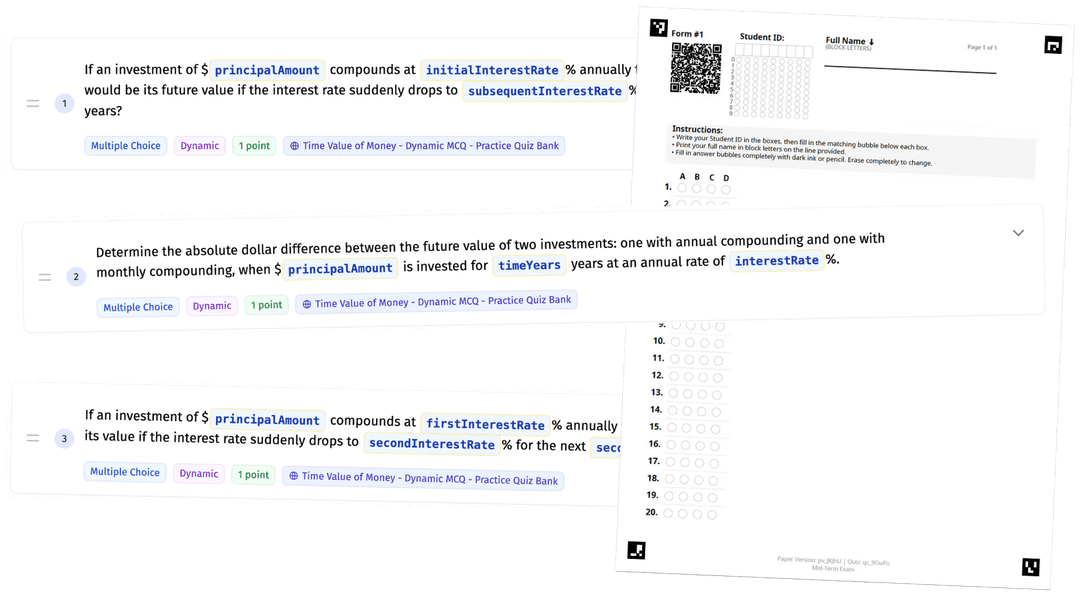
Create Cheat-Proof Paper Exams That Auto-Grade In Minutes

Generate unique multiple choice exams for every student automatically – randomized questions, shuffled answers, or dynamic problems with different numbers. Then scan and grade them all instantly. No Scantrons. Syncs to Canvas and Blackboard.

Free for U.S. business school instructors

▢️ Watch Quick Demo

πŸ‘‰ Create Your First Exam

No credit card required Β· Set up your first exam in under 15 minutes

Three Steps. Regular Paper. Any Scanner.

1. Build your exam once

Upload your questions or import from your existing test bank. Choose how to randomize: shuffle question order, shuffle answer order, or generate different numbers for quantitative problems. Takes most instructors under 15 minutes for their first exam.

2. Print on regular paper

No special forms or Scantron sheets. Print on standard paper. Each exam gets a unique QR code so the system knows which version each student received.

3. Scan with any scanner

Run the stack through your department's office scanner or use your phone. Grades sync to your Canvas or Blackboard gradebook in minutes. Students automatically see detailed feedback showing what they answered vs. correct answers.

πŸ‘‰ Create Your First Exam Now

Every Student Gets a Different Exam

Want to see what the actual exams look like?

πŸ‘† ️Download Example Exam Papers πŸ‘†

Stop Students From Sharing Answers

Choose one method or combine them:

  1. πŸ”€πŸ“ Randomize Questions

Build a question bank and the system randomly selects which questions each student sees. Student A gets 10 questions from your 20-question bank. Student B gets a different 10. Copying answers becomes useless.

  1. πŸ”€πŸ”’ Randomize Problems

For quantitative questions, each student gets different numbers. You write the problem once using variables (e.g., "Calculate NPV if initial investment = $X"). The system generates unique values for every exam.

  1. πŸ”ƒπŸ“ Shuffle Questions & Answers

Keep the same questions but randomize the question and answer order. Student A sees the same questions as Student B, but in a different order and with different ordering of answer options. Stops students from copying answer patterns.

Common Questions

πŸ€” Wait, this is actually free?

Yes – completely free for U.S. business school instructors. No credit card required, no feature limits, no student fees, no expiration. We make textbooks and courseware, and we're hoping that if you like this tool, you'll consider our other materials in the future. But the exam tool itself? Completely free.

πŸ“± What equipment do I need?

Any office scanner – the same one you use for copying handouts. Don't have one? A basic scanner costs $150-200 and processes 60 exams in under 5 minutes. In a pinch, phone photos work (though you'll need to manually review about 10% of answers vs. near-zero with a scanner).

🎯 How accurate is it?

The system uses optical mark recognition (OMR) to read bubble marks – the same technology banks use to process checks. When you scan exams with a standard scanner, accuracy is essentially 100%. If a bubble is ambiguous (student marked two answers, erased poorly, etc.), the system flags it for you to review manually. You're not trusting a black box – you verify edge cases yourself.

⏱️ How long does setup actually take?

Most instructors create their first exam in under 15 minutes. After that, under 5 minutes per exam. If you have existing questions in a Word doc or test bank, you can import them directly.

πŸ€” I'm already using MyLab/Connect/MindTap. Can I use this too?

Yes. This works alongside your existing platform. Keep using MyLab for homework and practice quizzes. Use ScanGrade for proctored midterms and finals where you need paper exams. Your Canvas/Blackboard gradebook syncs with both.

πŸ“Š What do students get back?

A detailed breakdown: every question, what they answered, whether it was correct, and what the right answer was. You control how much detail they see. No more students emailing you "which ones did I get wrong?"

πŸ”’ Does this only work for multiple choice?

Yes – this tool is built specifically for multiple choice questions with bubble-marked answers. If you need to grade essays or short answers, you'll still handle those manually. But if you're currently spending hours grading 100+ MCQ exams or avoiding paper exams because creating secure versions is too much work, this solves that problem.

πŸ”’ How does the system know which student got which exam version?

Each printed exam includes a unique QR code. When you scan, the system reads the QR code to match the student's answers to their specific exam version. Students just fill in their name or ID number at the top like a normal exam.

⏰ Can I start using this mid-semester?

Yes. Most instructors set up their first exam in under 15 minutes. If you have existing questions in a Word doc, test bank, or even just a list, you can import them directly. You don't have to rebuild from scratch.

πŸ“š Can I import my existing test banks from MyLab/Pearson/McGraw Hill?

Yes. You can copy-paste from Word docs, import from most test bank formats, or manually enter questions. If you're stuck, email us your file and we'll convert it for you (seriously, we’re here to help you get set up).

Used By Faculty At AACSB Business Schools

Built specifically for business school faculty who need secure, efficient paper exams.

University logos
University logos
University logos
University logos
University logos
University logos
University logos
University logos
University logos
University logos

"This tool is a game changer! It eliminates Scantrons, reduces grading errors, and significantly improves assessment integrity."

Dr. James Young | University of Oklahoma

Ready To Save Your Weekends?

Create your exams for free. No credit card required. Most instructors are up and running in under 15 minutes.

πŸ‘‰ Create Your First Exam

▢️ Watch Quick Demo

Still not sure?Β Email us at help@blended-teaching.com - we'll answer any questions, no sales pitch required.

Create Cheat-Proof Paper Exams That Auto-Grade In Minutes

Generate unique multiple choice exams for every student automatically – randomized questions, shuffled answers, or dynamic problems with different numbers. Then scan and grade them all instantly. No Scantrons. Syncs to Canvas and Blackboard.

Free for U.S. business school instructors

▢️ Watch Quick Demo

πŸ‘‰ Create Your First Exam Free

No credit card required Β· Set up your first exam in under 15 minutes

Three Steps. Regular Paper. Any Scanner.

1. Build your exam once

Upload your questions or import from your existing test bank. Choose how to randomize: shuffle question order, shuffle answer order, or generate different numbers for quantitative problems. Takes most instructors under 15 minutes for their first exam.

2. Print on regular paper

No special forms or Scantron sheets. Print on standard paper. Each exam gets a unique QR code so the system knows which version each student received.

3. Scan with any scanner

Run the stack through your department's office scanner or use your phone. Grades sync to your Canvas or Blackboard gradebook in minutes. Students automatically see detailed feedback showing what they answered vs. correct answers.

πŸ‘‰ Create Your First Exam Now

Every Student Gets a Different Exam

Want to see what the actual exams look like?

πŸ‘† ️Download Example Exam Papers πŸ‘†

Stop Students From Sharing Answers

Choose one method or combine them:

  1. πŸ”€πŸ“ Randomize Questions

Build a question bank and the system randomly selects which questions each student sees. Student A gets 10 questions from your 20-question bank. Student B gets a different 10. Copying answers becomes useless.

  1. πŸ”€πŸ”’ Randomize Problems

For quantitative questions, each student gets different numbers. You write the problem once using variables (e.g., "Calculate NPV if initial investment = $X"). The system generates unique values for every exam.

  1. πŸ”ƒπŸ“ Shuffle Questions & Answers

Keep the same questions but randomize the question and answer order. Student A sees the same questions as Student B, but in a different order and with different ordering of answer options. Stops students from copying answer patterns.

Common Questions

πŸ€” Wait, this is actually free?

Yes – completely free for U.S. business school instructors. No credit card required, no feature limits, no student fees, no expiration. We make textbooks and courseware, and we're hoping that if you like this tool, you'll consider our other materials in the future. But the exam tool itself? Completely free.

πŸ“± What equipment do I need?

Any office scanner – the same one you use for copying handouts. Don't have one? A basic scanner costs $150-200 and processes 60 exams in under 5 minutes. In a pinch, phone photos work (though you'll need to manually review about 10% of answers vs. near-zero with a scanner).

🎯 How accurate is it?

The system uses optical mark recognition (OMR) to read bubble marks – the same technology banks use to process checks. When you scan exams with a standard scanner, accuracy is essentially 100%. If a bubble is ambiguous (student marked two answers, erased poorly, etc.), the system flags it for you to review manually. You're not trusting a black box – you verify edge cases yourself.

⏱️ How long does setup actually take?

Most instructors create their first exam in under 15 minutes. After that, under 5 minutes per exam. If you have existing questions in a Word doc or test bank, you can import them directly.

πŸ€” I'm already using MyLab/Connect/MindTap. Can I use this too?

Yes. This works alongside your existing platform. Keep using MyLab for homework and practice quizzes. Use ScanGrade for proctored midterms and finals where you need paper exams. Your Canvas/Blackboard gradebook syncs with both.

πŸ“Š What do students get back?

A detailed breakdown: every question, what they answered, whether it was correct, and what the right answer was. You control how much detail they see. No more students emailing you "which ones did I get wrong?"

πŸ”’ Does this only work for multiple choice?

Yes – this tool is built specifically for multiple choice questions with bubble-marked answers. If you need to grade essays or short answers, you'll still handle those manually. But if you're currently spending hours grading 100+ MCQ exams or avoiding paper exams because creating secure versions is too much work, this solves that problem.

πŸ”’ How does the system know which student got which exam version?

Each printed exam includes a unique QR code. When you scan, the system reads the QR code to match the student's answers to their specific exam version. Students just fill in their name or ID number at the top like a normal exam.

⏰ Can I start using this mid-semester?

Yes. Most instructors set up their first exam in under 15 minutes. If you have existing questions in a Word doc, test bank, or even just a list, you can import them directly. You don't have to rebuild from scratch.

πŸ“š Can I import my existing test banks from MyLab/Pearson/McGraw Hill?

Yes. You can copy-paste from Word docs, import from most test bank formats, or manually enter questions. If you're stuck, email us your file and we'll convert it for you (seriously, we’re here to help you get set up).

Used By Faculty At AACSB Business Schools

Built specifically for business school faculty who need secure, efficient paper exams.

University logos
University logos
University logos
University logos
University logos
University logos
University logos
University logos
University logos
University logos
University logos

"This tool is a game changer! It eliminates Scantrons, reduces grading errors, and significantly improves assessment integrity."

Dr. James Young | University of Oklahoma

Ready To Save Your Weekends?

Create your exams for free. No credit card required. Most instructors are up and running in under 15 minutes.

πŸ‘‰ Create Your First Exam Free

▢️ Watch Quick Demo

Still not sure?Β Email us at help@blended-teaching.com - we'll answer any questions, no sales pitch required.

Create Cheat-Proof Paper Exams That Auto-Grade In Minutes

Generate unique multiple choice exams for every student automatically – randomized

questions, shuffled answers, or dynamic problems with different

numbers. Then scan and grade them all instantly. No Scantrons.

Syncs to Canvas and Blackboard.

Free for U.S. business school instructors

▢️ Watch Quick Demo

πŸ‘‰ Create Your First Exam Free

No credit card required Β· Set up your first exam in under 15 minutes

Three Steps. Regular Paper. Any Scanner.

1. Build your exam once

Upload your questions or import from your existing test bank. Choose how to randomize: shuffle question order, shuffle answer order, or generate different numbers for quantitative problems. Takes most instructors under 15 minutes for their first exam.

2. Print on regular paper

No special forms or Scantron sheets. Print on standard paper. Each exam gets a unique QR code so the system knows which version each student received.

3. Scan with any scanner

Run the stack through your department's office scanner or use your phone. Grades sync to your Canvas or Blackboard gradebook in minutes. Students automatically see detailed feedback showing what they answered vs. correct answers.

πŸ‘‰ Create Your First Exam Now

Every Student Gets a Different Exam

Want to see what the actual exams look like?

πŸ‘† ️Download Example Exam Papers πŸ‘†

Stop Students From Sharing Answers

Choose one method or combine them:

  1. πŸ”€πŸ“ Randomize Questions

Build a question bank and the system randomly selects which questions each student sees. Student A gets 10 questions from your 20-question bank. Student B gets a different 10. Copying answers becomes useless.

  1. πŸ”€πŸ”’ Randomize Problems

For quantitative questions, each student gets different numbers. You write the problem once using variables (e.g., "Calculate NPV if initial investment = $X"). The system generates unique values for every exam.

  1. πŸ”ƒπŸ“ Shuffle Questions & Answers

Keep the same questions but randomize the question and answer order. Student A sees the same questions as Student B, but in a different order and with different ordering of answer options. Stops students from copying answer patterns.

Common Questions

πŸ€” Wait, this is actually free?

Yes – completely free for U.S. business school instructors. No credit card required, no feature limits, no student fees, no expiration. We make textbooks and courseware, and we're hoping that if you like this tool, you'll consider our other materials in the future. But the exam tool itself? Completely free.

πŸ“± What equipment do I need?

Any office scanner – the same one you use for copying handouts. Don't have one? A basic scanner costs $150-200 and processes 60 exams in under 5 minutes. In a pinch, phone photos work (though you'll need to manually review about 10% of answers vs. near-zero with a scanner).

🎯 How accurate is it?

The system uses optical mark recognition (OMR) to read bubble marks – the same technology banks use to process checks. When you scan exams with a standard scanner, accuracy is essentially 100%. If a bubble is ambiguous (student marked two answers, erased poorly, etc.), the system flags it for you to review manually. You're not trusting a black box – you verify edge cases yourself.

⏱️ How long does setup actually take?

Most instructors create their first exam in under 15 minutes. After that, under 5 minutes per exam. If you have existing questions in a Word doc or test bank, you can import them directly.

πŸ€” I'm already using MyLab/Connect/MindTap. Can I use this too?

Yes. This works alongside your existing platform. Keep using MyLab for homework and practice quizzes. Use ScanGrade for proctored midterms and finals where you need paper exams. Your Canvas/Blackboard gradebook syncs with both.

πŸ“Š What do students get back?

A detailed breakdown: every question, what they answered, whether it was correct, and what the right answer was. You control how much detail they see. No more students emailing you "which ones did I get wrong?"

πŸ”’ Does this only work for multiple choice?

Yes – this tool is built specifically for multiple choice questions with bubble-marked answers. If you need to grade essays or short answers, you'll still handle those manually. But if you're currently spending hours grading 100+ MCQ exams or avoiding paper exams because creating secure versions is too much work, this solves that problem.

πŸ”’ How does the system know which student got which exam version?

Each printed exam includes a unique QR code. When you scan, the system reads the QR code to match the student's answers to their specific exam version. Students just fill in their name or ID number at the top like a normal exam.

⏰ Can I start using this mid-semester?

Yes. Most instructors set up their first exam in under 15 minutes. If you have existing questions in a Word doc, test bank, or even just a list, you can import them directly. You don't have to rebuild from scratch.

πŸ“š Can I import my existing test banks from MyLab/Pearson/McGraw Hill?

Yes. You can copy-paste from Word docs, import from most test bank formats, or manually enter questions. If you're stuck, email us your file and we'll convert it for you (seriously, we’re here to help you get set up).

Used By Faculty At AACSB Business Schools

Built specifically for business school faculty who need secure, efficient paper exams.

University logos
University logos
University logos
University logos
University logos
University logos
University logos
University logos
University logos
University logos
University logos

"This tool is a game changer! It eliminates Scantrons, reduces grading errors, and significantly improves assessment integrity."

Dr. James Young | University of Oklahoma

Ready To Save Your Weekends?

Create your exams for free. No credit card required. Most instructors are up and running in under 15 minutes.

πŸ‘‰ Create Your First Exam Free

▢️ Watch Quick Demo

Still not sure?Β Email us at help@blended-teaching.com - we'll answer any questions, no sales pitch required.

Create Cheat-Proof Paper Exams That Auto-Grade In Minutes

Build multiple choice exams once, print randomized versions for each student, scan with any scanner. Instant results, zero grading time. Syncs to Canvas and Blackboard.

Free for U.S. business school instructors

▢️ Watch Quick Demo

πŸ‘‰ Create Your First Exam Free

No credit card required Β· Set up your first exam in under 15 minutes

Three Steps. Regular Paper. Any Scanner.

1. Build your exam once

Upload your questions or import from your existing test bank. Choose how to randomize: shuffle question order, shuffle answer order, or generate different numbers for quantitative problems. Takes most instructors under 15 minutes for their first exam.

2. Print on regular paper

No special forms or Scantron sheets. Print on standard paper. Each exam gets a unique QR code so the system knows which version each student received.

3. Scan with any scanner

Run the stack through your department's office scanner or use your phone. Grades sync to your Canvas or Blackboard gradebook in minutes. Students automatically see detailed feedback showing what they answered vs. correct answers.

πŸ‘‰ Create Your First Exam Now

Every Student Gets a Different Exam

Want to see what the actual exams look like?

πŸ‘† ️Download Example Exam Papers πŸ‘†

Stop Students From Sharing Answers

Choose one method or combine them:

  1. πŸ”€πŸ“ Randomize Questions

Build a question bank and the system randomly selects which questions each student sees. Student A gets 10 questions from your 20-question bank. Student B gets a different 10. Copying answers becomes useless.

  1. πŸ”€πŸ”’ Randomize Problems

For quantitative questions, each student gets different numbers. You write the problem once using variables (e.g., "Calculate NPV if initial investment = $X"). The system generates unique values for every exam.

  1. πŸ”ƒπŸ“ Shuffle Questions & Answers

Keep the same questions but randomize the question and answer order. Student A sees the same questions as Student B, but in a different order and with different ordering of answer options. Stops students from copying answer patterns.

Common Questions

πŸ€” Wait, this is actually free?

Yes – completely free for U.S. business school instructors. No credit card required, no feature limits, no student fees, no expiration. We make textbooks and courseware, and we're hoping that if you like this tool, you'll consider our other materials in the future. But the exam tool itself? Completely free.

πŸ“± What equipment do I need?

Any office scanner – the same one you use for copying handouts. Don't have one? A basic scanner costs $150-200 and processes 60 exams in under 5 minutes. In a pinch, phone photos work (though you'll need to manually review about 10% of answers vs. near-zero with a scanner).

🎯 How accurate is it?

The system uses optical mark recognition (OMR) to read bubble marks – the same technology banks use to process checks. When you scan exams with a standard scanner, accuracy is essentially 100%. If a bubble is ambiguous (student marked two answers, erased poorly, etc.), the system flags it for you to review manually. You're not trusting a black box – you verify edge cases yourself.

⏱️ How long does setup actually take?

Most instructors create their first exam in under 15 minutes. After that, under 5 minutes per exam. If you have existing questions in a Word doc or test bank, you can import them directly.

πŸ€” I'm already using MyLab/Connect/MindTap. Can I use this too?

Yes. This works alongside your existing platform. Keep using MyLab for homework and practice quizzes. Use ScanGrade for proctored midterms and finals where you need paper exams. Your Canvas/Blackboard gradebook syncs with both.

πŸ“Š What do students get back?

A detailed breakdown: every question, what they answered, whether it was correct, and what the right answer was. You control how much detail they see. No more students emailing you "which ones did I get wrong?"

πŸ”’ Does this only work for multiple choice?

Yes – this tool is built specifically for multiple choice questions with bubble-marked answers. If you need to grade essays or short answers, you'll still handle those manually. But if you're currently spending hours grading 100+ MCQ exams or avoiding paper exams because creating secure versions is too much work, this solves that problem.

πŸ”’ How does the system know which student got which exam version?

Each printed exam includes a unique QR code. When you scan, the system reads the QR code to match the student's answers to their specific exam version. Students just fill in their name or ID number at the top like a normal exam.

⏰ Can I start using this mid-semester?

Yes. Most instructors set up their first exam in under 15 minutes. If you have existing questions in a Word doc, test bank, or even just a list, you can import them directly. You don't have to rebuild from scratch.

πŸ“š Can I import my existing test banks from MyLab/Pearson/McGraw Hill?

Yes. You can copy-paste from Word docs, import from most test bank formats, or manually enter questions. If you're stuck, email us your file and we'll convert it for you (seriously, we’re here to help you get set up).

Used By Faculty At AACSB Business Schools

Built specifically for business school faculty who need secure, efficient paper exams.

University logos
University logos
University logos
University logos
University logos
University logos
University logos
University logos
University logos
University logos
University logos

"This tool is a game changer! It eliminates Scantrons, reduces grading errors, and significantly improves assessment integrity."

Dr. James Young | University of Oklahoma

Ready To Save Your Weekends?

Create your exams for free. No credit card required. Most instructors are up and running in under 15 minutes.

πŸ‘‰ Create Your First Exam Free

▢️ Watch Quick Demo

Still not sure?Β Email us at help@blended-teaching.com - we'll answer any questions, no sales pitch required.